























































Workspaces

Shading
Build materials with nodes and preview them.
The workspace to do all the shader and material work. It comes with a file browser, an image editor, the 3D view in a special view look setup, the shader editor, outliner and properties editor.
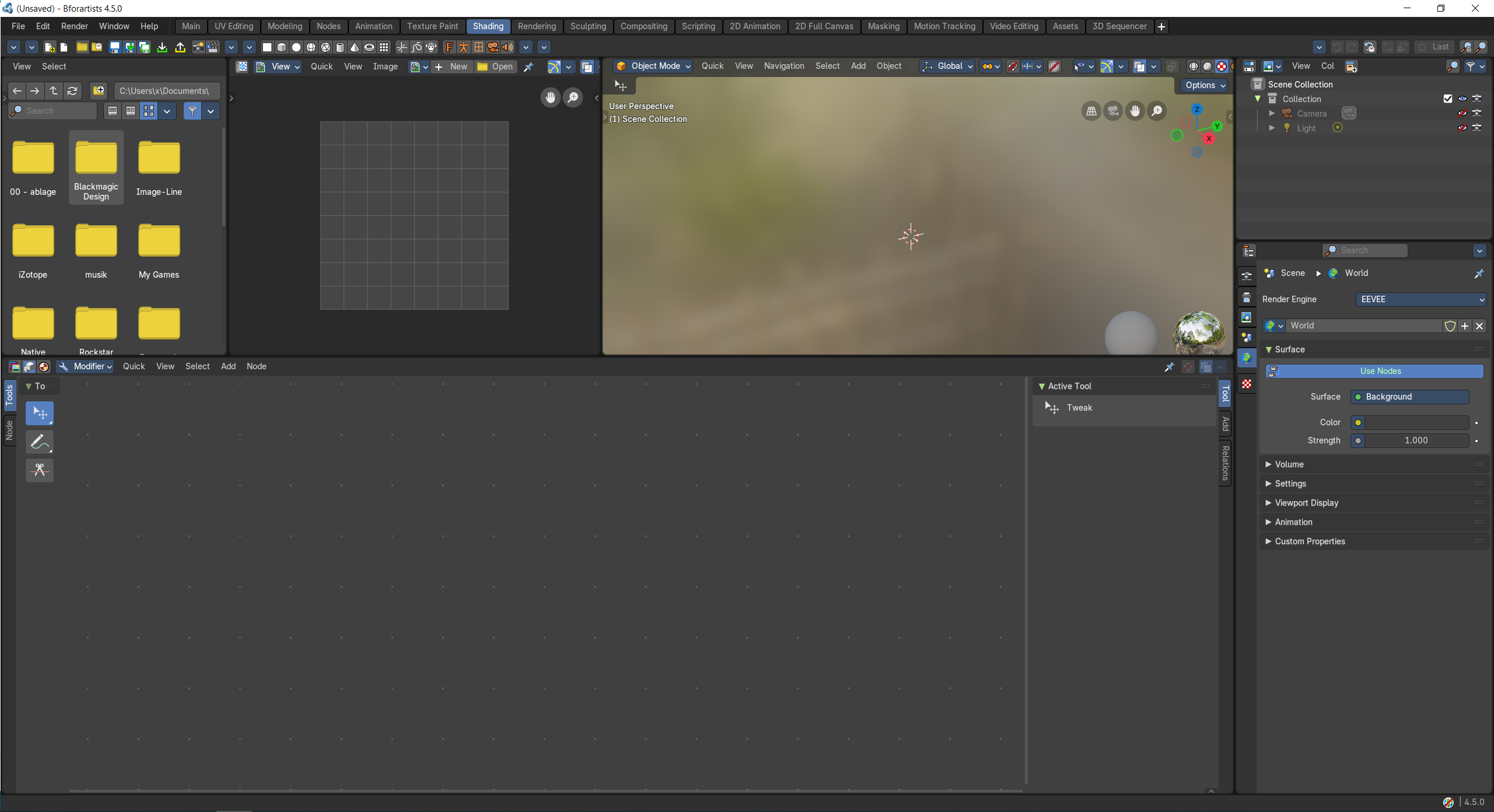
- Screenshot
- Topbar — Menus, the workspace tabs and the main toolbar.
- File Browser — Find textures on disk and drag them into the Shader Editor.
- Image Editor — Check the textures your material uses.
- 3D Viewport — Live material preview with studio lighting.
- Shader Editor — Build the material by connecting nodes: the heart of this workspace.
- Outliner — Pick the object you are shading.
- Properties Editor — Material and world settings without nodes.
How the work flows
Shading is where surfaces get their look. You build the material in the Shader Editor by connecting nodes, the heart of this workspace, while the 3D Viewport previews it with studio lighting so you judge the result as you go. The File Browser finds textures on disk to drag straight into the node tree, and the Image Editor lets you check them. The Outliner picks the object, and the Properties Editor covers material and world settings without nodes.