























































Workspaces

Animation
Keyframe and time your animation.
This workspace provides you with a layout that is optimized for Animation tasks. It contains two 3D View editors, an Info Editor, a Outliner Editor, a Properties Editor, a Timeline Editor, a Dope Sheet Editor.
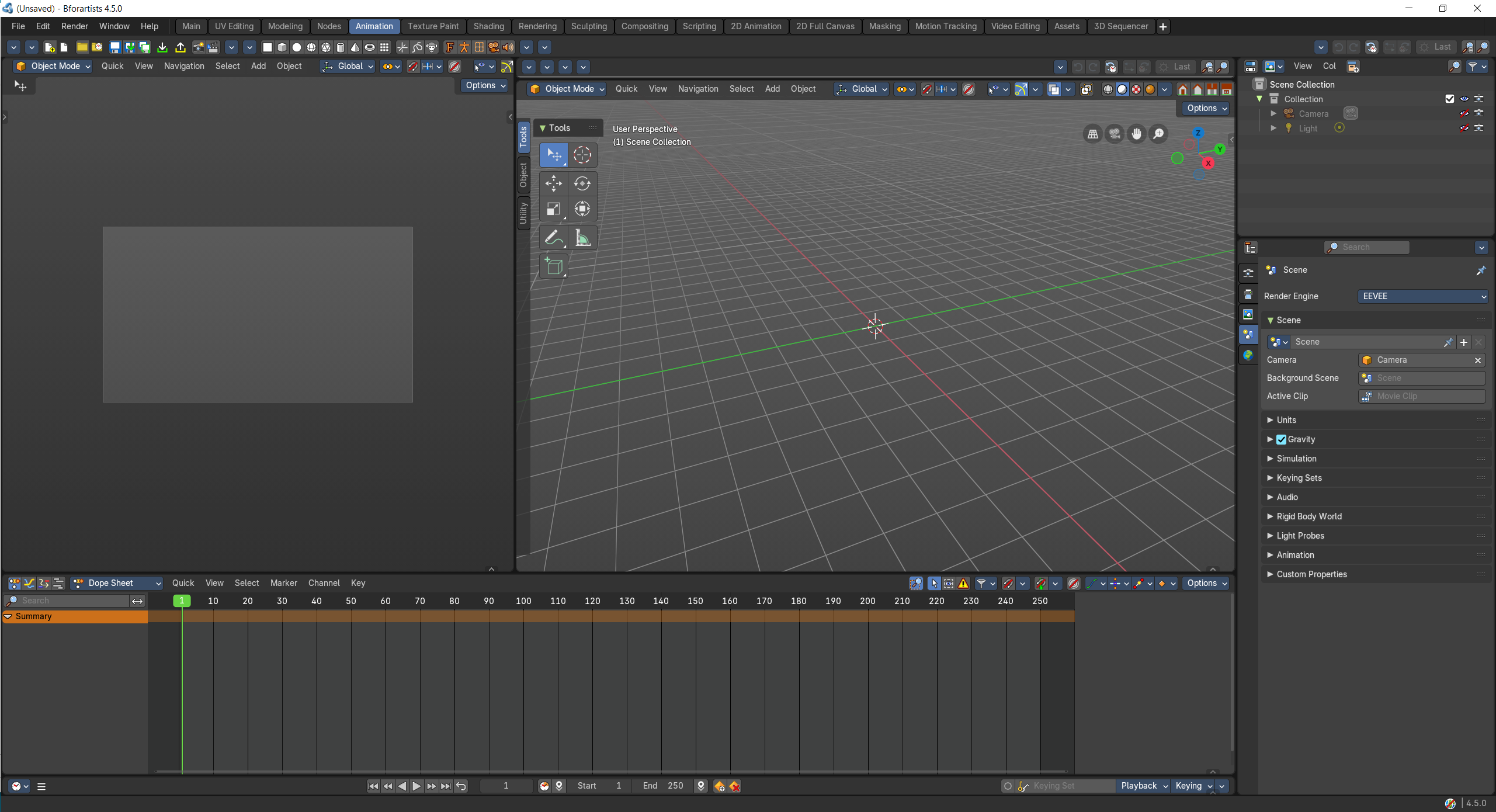
- Screenshot
- Topbar — Menus, the workspace tabs and the main toolbar.
- 3D Viewport — A camera view to check your shot while you animate.
- 3D Viewport — Pose and key your characters and objects.
- Dope Sheet — All the keyframes of the selected objects; move and retime them.
- Timeline — Playback, frame range and auto keying.
- Outliner — Pick what to animate.
- Properties Editor — Object, bone and constraint settings.
How the work flows
Animation is set up like a small film set. One 3D Viewport is your stage, where you pose and key characters and objects; the second looks through the camera, so you always see the shot as the audience will. Every key lands in the Dope Sheet, where timing becomes visible and you slide, stretch and retime the beats, and the Timeline plays it back and records with auto keying. The Outliner picks who moves next, and the Properties Editor holds bones and constraints.