























































Workspaces

2D Animation
Draw and animate in 2D with Grease Pencil.
A workspace to work with the grease pencil and to create 2D animation.
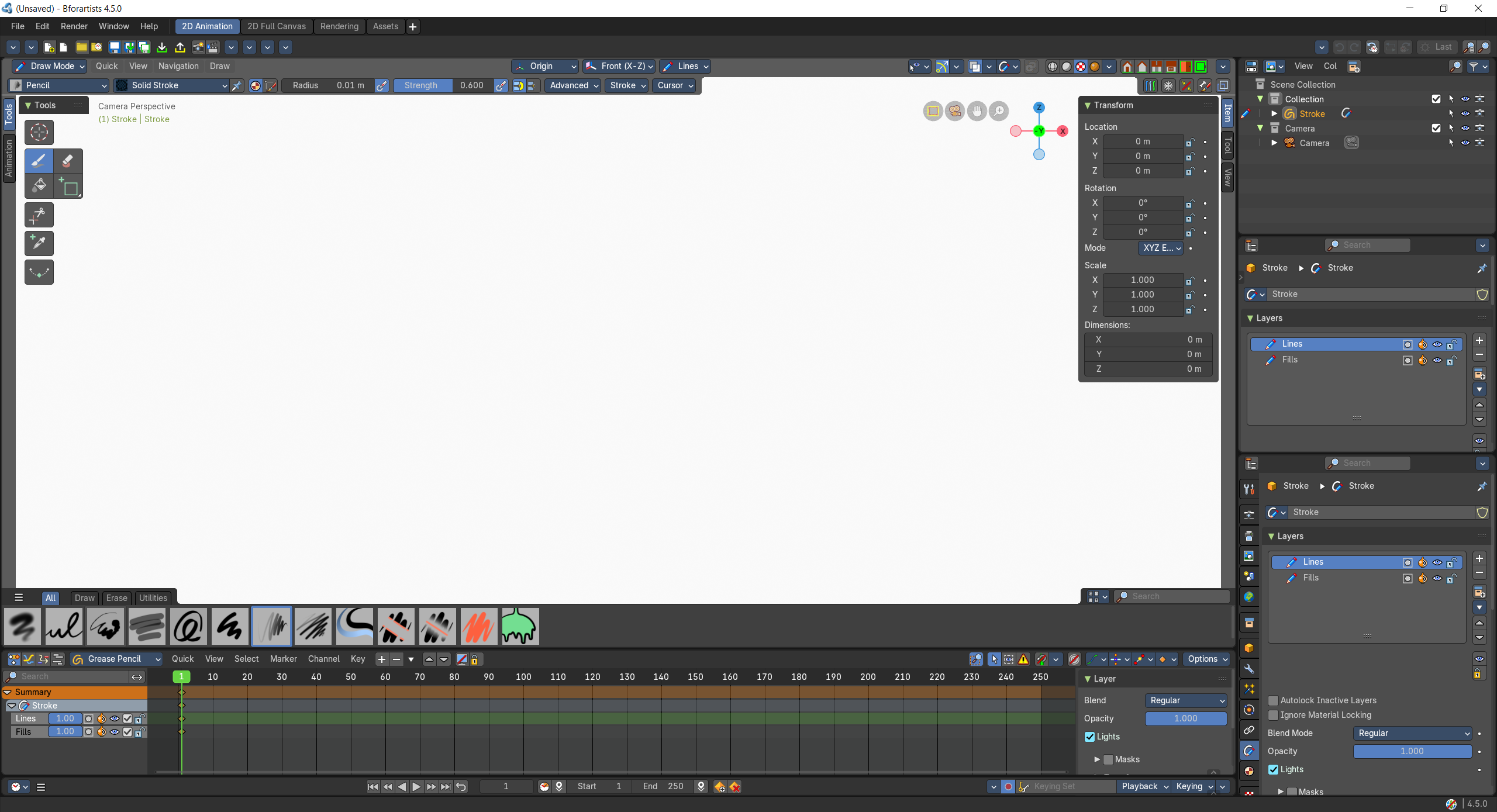
- Screenshot
- Topbar — Menus, the workspace tabs and the main toolbar.
- 3D Viewport — Draw on a white canvas with Grease Pencil, through the camera.
- Dope Sheet — Grease Pencil keyframes, one row per layer.
- Timeline — Playback and onion skin timing.
- Outliner — Your Grease Pencil objects and camera.
- Properties Editor — Layers of the selected Grease Pencil object.
- Properties Editor — Layer blend, opacity and masks.
How the work flows
2D Animation is a drawing desk for hand-drawn animation. Through the camera, the 3D Viewport is a white sheet where you draw with Grease Pencil, and each drawing becomes a key in the Dope Sheet, one row per layer, so timing reads like an exposure sheet. The Timeline plays it back with onion skins to judge the motion. Two Properties Editors keep the layers, their blending, opacity and masks close, and the Outliner holds your drawings and the camera.
Starts in
The workspace opens the 3D Viewport in Draw Mode when the scene has an object for it.