























































Interface

Headers
The strip at the top of every editor: menus, tools and settings, scrolled and collapsed.
Every editor has a header area. It usually contains the menu. And some tools or settings.
Scroll Header
A header can be scrolled! This is especially useful in the layouts where the header is this crowded with tools that it doesn't fit to display all content into the layout anymore. This is for example the case in the UV layout.
To scroll the header, click with the middle mouse button at it, and drag.

Collapse Menus
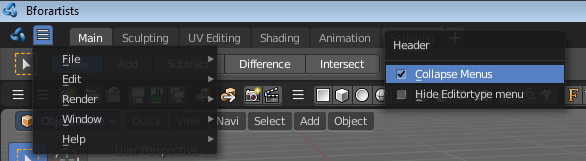
The text menus can be collapsed to free some UI space. Right click at an empty space somewhere at the menu bar of an editor. You will see a menu now. Choose if you want to display the text menu collapsed or expanded.