
























































Grease Pencil
Grease Pencil nodes: Read, Write, Operations.
Read
Add menu - Grease Pencil - Read
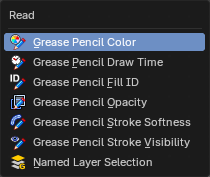
Grease pencil nodes.
Grease Pencil Color
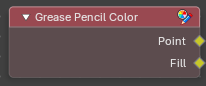
Reads the color of the points and of the fills. Use it to drive other values from the colors you painted, or to select all strokes of one color with a Compare node. The Point output is the stroke color of each point. The Fill output is the fill color of each stroke.
Outputs
Point
Data type: Color.
The stroke color of each point.
Fill
Data type: Color.
The fill color of each stroke.
Grease Pencil Draw Time
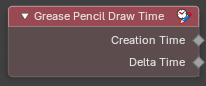
Tells you when a stroke was drawn. Use it to replay a drawing in the order it was made, for example by deleting every point whose time is later than the current frame, so that the drawing appears to be drawn live. Both values are in seconds.
Outputs
Creation Time
Data type: Float.
The time at which the stroke was created. Every point of a stroke has the same value.
Delta Time
Data type: Float.
How long after the start of its stroke each point was drawn.
Grease Pencil Fill ID
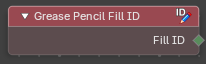
Reads the fill group of each stroke. Strokes that have the same Fill ID are filled together as one shape, which is how an outline made of several strokes gets a single fill. Use it to find out which strokes belong to the same fill, or to select all strokes of one fill.
Outputs
Fill ID
Data type: Integer.
The number of the fill group. Strokes with the same number share one fill.
Grease Pencil Opacity
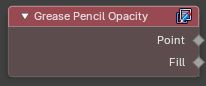
Reads how opaque the strokes and the fills are. Use it to select faint strokes, for example to delete everything below a chosen opacity, or to fade a drawing by feeding the value into a Set Grease Pencil Color node.
Outputs
Point
Data type: Float.
The opacity of each point of a stroke, from 0 (invisible) to 1 (solid).
Fill
Data type: Float.
The opacity of the fill of each stroke, from 0 to 1.
Grease Pencil Stroke Softness
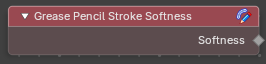
Reads the softness of each stroke. Softness is the falloff toward the border of the stroke: 1 is a sharp border and lower values fade out toward the edge. Use it to pick out soft or sharp strokes, or to compare values before you change them with Set Grease Pencil Softness.
Outputs
Softness
Data type: Float.
The softness of each stroke.
Grease Pencil Stroke Visibility
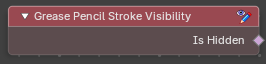
Tells you which strokes are hidden. Hidden strokes still exist; they are only not drawn. Use it to skip hidden strokes in an operation, or to delete them for good.
Outputs
Is Hidden
Data type: Boolean.
True for strokes that are hidden.
Named Layer Selection
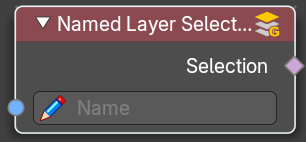
Outputs a selection of a grease pencil layer by its name.
Inputs
Name
Data type: String.
The name of the selection.
Outputs
Selection
Data type: Boolean.
The selected grease pencil geometry.
Write
Add menu - Grease Pencil - Write
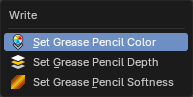
Grease pencil nodes.
Set Grease Pencil Color
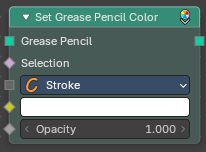
Sets the color and opacity of grease pencil strokes, fills or both. Use it to recolor a drawing procedurally, for example to tint strokes by their layer or to fade the drawing out over time. Only the selected part of the drawing changes.
Inputs
Grease Pencil
Data type: Geometry.
The grease pencil geometry.
Selection
Data type: Boolean.
Which strokes are changed. By default everything is.
Mode
Data type: Menu.
What is colored: Stroke changes the stroke color, Fill changes the fill color and Both changes both.
Color
Data type: Color.
The new color.
Opacity
Data type: Float.
The new opacity, from 0 (invisible) to 1 (solid).
Outputs
Grease Pencil
Data type: Geometry.
The grease pencil geometry with the new colors.
Set Grease Pencil Depth
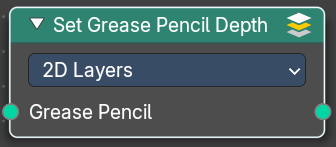
Set the grease pencil depth order to use. By 2d layers, or by the position in 3d space.
Inputs
Grease Pencil
Data type: Geometry.
The grease pencil geometry.
Properties
Depth Order
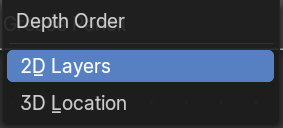
2D Layers
Set the grease pencil depth by the 2d layers.
3D Location
Set the grease pencil depth by the postion in 3d space.
Outputs
Grease Pencil
Data type: Geometry.
The grease pencil geometry.
Set Grease Pencil Softness
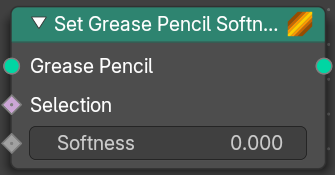
Adjust the falloff towards the stoke border.
Inputs
Grease Pencil
Data type: Geometry.
The grease pencil geometry.
Selection
Data type: Boolean.
A selection of the grease pencil geometry.
Softness
Data type: Float.
The falloff softness. A value of 1 means sharp border. A falloff of 0 means a falloff from the center to the border with a complete transparency at the border.
Outputs
Grease Pencil
Data type: Geometry.
The grease pencil geometry.
Operations
Add menu - Grease Pencil - Operations
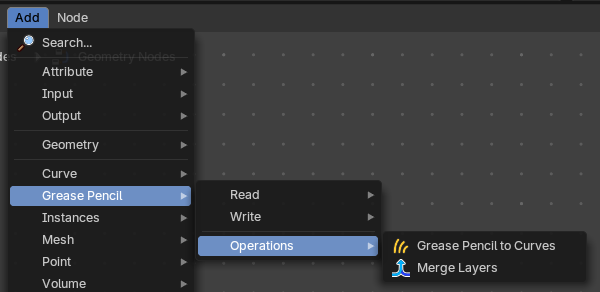
Grease Pencil nodes.
Grease Pencil to Curves

Converts a grease pencil geometry to a curve geometry
Inputs
Grease Pencil
Data type: Geometry.
The grease pencil geometry.
Selection
Data type: Boolean.
A selection of the grease pencil geometry.
Layers as Instances
Data type: Boolean.
Generate a separate curve instance for every layer.
Outputs
Curves
Data type: Geometry.
Curves output.
Merge Layers
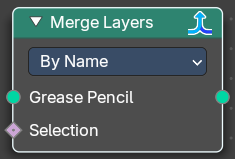
Merge all grease pencil layers into one layer
Grease Pencil
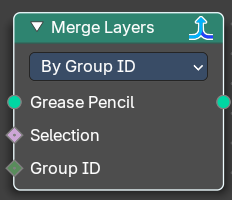
The grease pencil geometry.
Selection
A selection of the grease pencil geometry.
Group ID
In By Group ID mode. Input a group ID value.
Properties
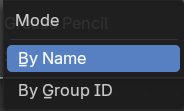
Mode
By Name
Combine all layers which have the same name.
By Group ID
Combine all layers by a provided Group ID.
Outputs
Grease Pencil
Data type: Geometry.
Grease Pencil geometry output.